
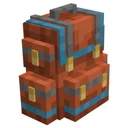
Sophisticated Backpacks · Explained · Beginner
All Sophisticated Backpack Upgrades Explained: Complete Tier & Function List
Sophisticated Backpacks transforms ordinary portable storage into a fully automated utility belt through its modular upgrade system. This guide explains how backpack tiers determine your upgrade capacity and breaks down the exact mechanics of essential functional upgrades like Magnet, Feeding, Refill, and Deposit. Mastering these upgrades will automate your inventory management, keep you alive in combat, and save hours of manual chest sorting.
What you need
- Sophisticated Backpacks and Sophisticated Core installed
- Any Backpack (Leather, Iron, Gold, Diamond, or Netherite)
- Upgrade Base (crafted from leather, iron ingots, and string)
- Raw materials for upgrades (Redstone, Iron, Gold, Diamonds, Ender Pearls, Hoppers, Pistons)
- JEI or REI installed to check exact crafting recipes
Step by step
1Scale Your Upgrade Slots by Upgrading Backpack Tiers
Before crafting complex modules, you need slots to hold them. A basic Leather Backpack only has a single upgrade slot on the left side of its GUI. By surrounding your backpack with Iron, Gold, or Diamonds in a crafting grid—or combining a Diamond Backpack with a Netherite Ingot at a Smithing Table—you expand both storage capacity and upgrade slots. Each tier up to Netherite adds an additional upgrade slot, allowing you to run multiple automation modules simultaneously.
Tip: Always upgrade your existing backpack directly in the crafting grid; it preserves all items and upgrades currently inside it.
2Craft the Upgrade Base and Understand Basic vs. Advanced Tiers
Every functional module starts with an Upgrade Base. When you combine an Upgrade Base with specific vanilla items (like a Sticky Piston for a Pickup Upgrade), you get the basic version of that upgrade. Surrounding any basic upgrade with Gold Ingots, Redstone, and Diamonds upgrades it to the Advanced version. Basic upgrades have limited filter slots and simple toggle rules, whereas Advanced upgrades unlock larger filter grids, durability matching, and NBT data filtering.
Tip: Check JEI for the exact recipe of each upgrade, as they closely mirror the vanilla items that represent their function.
3Automate Item Collection with Pickup and Magnet Upgrades
Insert a Pickup Upgrade into an upgrade slot to make loot bypass your main player inventory and go straight into the backpack. Open its configuration tab on the right side of the GUI and set it to 'Match Backpack Contents' so it only grabs items you are already storing inside. If you want to pull items from a distance, use a Magnet Upgrade instead. The Magnet physically pulls nearby dropped entities toward you and stores them directly in the backpack, bypassing your hotbar entirely.
Tip: Set your Magnet Upgrade to Blocklist mode and add Cobblestone or Netherrack to avoid filling your bag with junk while mining.
4Set Up Autonomous Healing with the Feeding Upgrade
Craft a Feeding Upgrade (using a Golden Carrot or Apple around an Upgrade Base) and slot it into your backpack alongside a stack of food in the main storage area. The Basic Feeding Upgrade automatically feeds you whenever you are hungry enough to consume the entire hunger value of a food item without wasting saturation. Upgrade to the Advanced Feeding Upgrade to gain custom controls, allowing you to tell the backpack to feed you immediately when your health drops, even if your hunger bar is nearly full.
Tip: Filter out Golden Apples, Chorus Fruit, and Spider Eyes in the Feeding tab so the backpack doesn't waste rare buffs or poison you.
5Keep Your Hotbar Full Using the Refill Upgrade
The Refill Upgrade ensures you never run out of building blocks or torches mid-project. Place it in an upgrade slot, open its side tab, and drag a phantom copy of the block you are building with into the filter slot. As you place blocks from your hotbar, the Refill Upgrade watches that stack and instantly pushes replacement items from the backpack into your hand before the stack hits zero. The Advanced Refill Upgrade lets you lock specific hotbar slots to specific items.
Tip: Use the Advanced Refill Upgrade to keep a fresh Totem of Undying or water bucket locked to your off-hand slot.
6Dump Loot Instantly with Deposit and Restock Upgrades
Craft a Deposit Upgrade (using a Chest) to unload your backpack into external storage in one click. Hold your backpack in your hand and Shift + Right-Click any chest or Sophisticated Storage barrel to transfer items from the backpack into the container. Conversely, the Restock Upgrade (crafted with a Hopper) pulls items out of a chest and into your backpack when you Shift + Right-Click. By configuring their filter tabs to 'Match Inventory Contents', a Deposit Upgrade will only push items into a chest that already contains at least one of that item.
Tip: Walk down a row of storage chests and Shift + Right-Click each one with a Deposit Upgrade installed to sort an entire mining trip in seconds.
7Expand Capacity and Utility with Stack, Tool, and Jukebox Upgrades
To round out your backpack, install a Stack Upgrade to multiply the max stack size of slots inside the bag (from 64 up to hundreds or thousands depending on the Stack Upgrade tier). You can also add a Jukebox Upgrade, which gives the backpack a slot for a Music Disc and play/stop buttons to blast music while you explore. Other specialized modules include the Composter, Stonecutter, Crafting, and Smelting upgrades, which embed portable workstations directly into the side tabs of your backpack GUI.
Tip: Combine a Pickup Upgrade with a Void Upgrade filtered to cobblestone to automatically delete excess stone while mining.
How it works
Sophisticated Backpacks uses an event-driven tick and interception system. When you walk over an item with a Pickup Upgrade active, the mod intercepts the vanilla player pickup event before the item touches your main inventory. It checks the item ID against the filter array configured in the upgrade's side tab. If the item passes the Allow/Block check, it is routed directly into the backpack's internal inventory array; if it fails or the backpack is full, the event falls back to your standard player inventory.
Active upgrades like the Magnet, Feeding, and Smelting modules run on periodic tick checks while the backpack is worn in a Curios/Trinkets slot or sitting in your main inventory. To preserve server performance, they do not check every single game tick; instead, they poll your hunger level or scan the surrounding bounding box for item entities at short intervals. Interaction upgrades like Deposit and Restock do not use tick polling at all—they trigger exclusively on the block-interaction event when you Shift + Right-Click a valid inventory capability block.
Common mistakes
- Forgetting to turn the upgrade on: Every upgrade slot has a small toggle switch next to it. If the switch is grayed out or off, the upgrade is disabled even if configured properly.
- Removing a Stack Upgrade while the backpack is overfilled: You cannot pull a Stack Upgrade out of its slot if any slot in the backpack currently holds more than the standard 64 items. Consolidate or remove the oversized stacks first.
- Confusing Restock with Refill: Remember that Refill moves items from your backpack into your player hotbar, while Restock pulls items from an external chest into your backpack.
- Using Basic Deposit without filters: Shift + Right-Clicking a chest with an unfiltered Deposit Upgrade will dump everything from your backpack into that chest, ruining your organization. Always set the filter to match existing chest contents.
FAQ
Do upgrades work if the backpack is just sitting in my inventory instead of worn on my back?
Yes, functional upgrades like Pickup, Magnet, Feeding, and Refill work whether the backpack is equipped in your back slot or sitting anywhere inside your main inventory or hotbar.
Can I stack multiple Stack Upgrades in the same backpack?
Yes, as long as you have empty upgrade slots and haven't exceeded the mod's hard integer limit, placing multiple Stack Upgrades in one backpack multiplies their effects together for massive storage density.
How do I stop my backpack from being picked up by another backpack?
By default, backpacks cannot be inception-nested unless you install an Inception Upgrade. Even then, use the Blocklist filter on your Magnet and Pickup upgrades to prevent grabbing items you want to leave on the ground.
Why isn't my Deposit Upgrade transferring items into my chests?
Make sure you are holding the backpack in your main hand and holding Shift while Right-Clicking the chest. Also verify that your Deposit tab filter isn't set to an empty Allowlist, which blocks all transfers.
By upgrading your backpack tier to unlock more slots and combining filtered Advanced Upgrades like Magnet, Feeding, Refill, and Deposit, you can automate item collection, survival, and storage sorting directly from your back.