Moving Elevators
Multi-floor moving platform elevators with customizable cabin sizes, speeds, and controller buttons.
 Trains & Transport
- Downloads
- 13,958,578
- Loaders
- Fabric, Forge, NeoForge, Quilt
- Latest version
- 26.x
- Updated
- 2026-11-04
- Author
- SuperMartijn642



Overview
Moving Elevators is a Minecraft mod that lets players construct functional, animated elevators capable of transporting both players and other entities across multiple floors. Unlike simple teleportation pads, this mod shifts an actual block platform smoothly between levels at the push of a button.
It is an ideal addition for builders and modpack creators—as the author freely allows modpack inclusion—who want customizable vertical transport without an energy requirement. Because the controllers and displays can be camouflaged to match any block, the system blends seamlessly into any aesthetic.
Within a tech or automation base, the mod provides practical utility through redstone and comparator integration. Players can summon platforms via redstone signals, detect platform arrivals with comparators, and place bound remote panels anywhere for convenient access.
Key features
- Moving platforms physically transport players and other entities between any number of floors with no distance limit.
- Elevator Controllers allow users to customize the platform's dimensions, movement speed, and individual floor names.
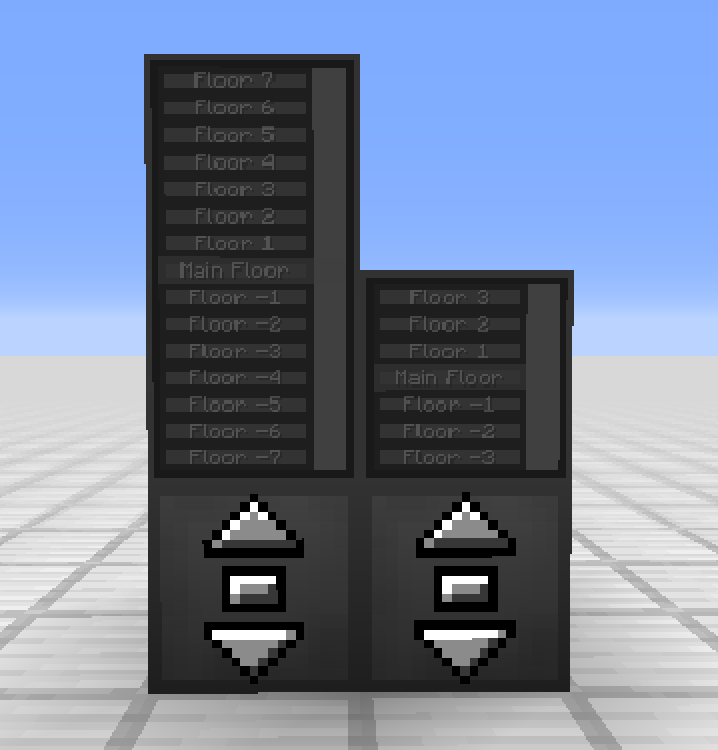
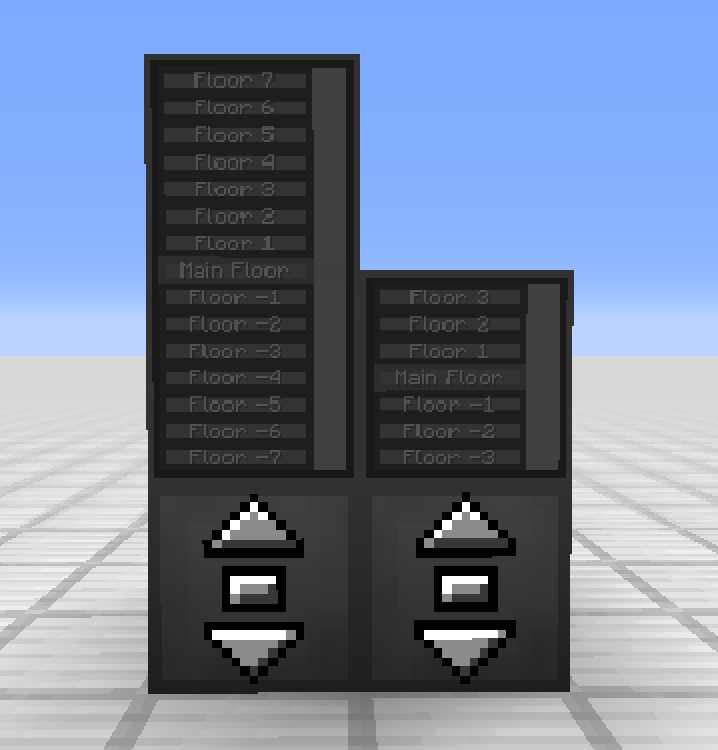
- Elevator Displays can be stacked up to two blocks high on top of controllers or remote panels to show floor lists and the platform's real-time location.
- Floor buttons on the Elevator Display can be color-coded by right-clicking them with dyes.
- Both Elevator Controllers and Elevator Displays can be disguised as other blocks or stripped of their camouflage using an empty hand.
- Remote Elevator Panels can be linked to an Elevator Controller and positioned anywhere while still supporting Elevator Displays on top.
- The system integrates with redstone by accepting signals to call the platform and outputting comparator signals when the platform is present.
How to get started
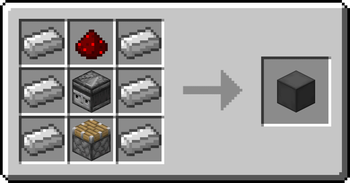
- Craft a minimum of two Elevator Controllers and position the first one at your starting floor.
- Right-click a buttonless side of the controller to configure your preferred floor name, platform dimensions, and travel speed.
- Build the physical platform out of blocks one level below the controller, directly in front of the side featuring the buttons.
- Install additional Elevator Controllers directly above or below the original unit, ensuring they all face the exact same direction.
- Press the center button on the controller to summon the elevator, and use the up or down buttons to travel between your floors.
- Optionally, place one or two Elevator Displays on top of your controller to select specific destination floors directly.
FAQ
Does the elevator system require power or energy to run?
No, the Elevator Controller operates without consuming any energy.
Is there a maximum distance allowed between different elevator floors?
No, there is no limit on how far apart your floors can be placed.
Why does the moving platform pass right through solid blocks between floors?
The platform only checks for blocks at floor level and ignores obstacles in between to preserve game performance and avoid checking hundreds of blocks every tick.
Which mod loaders and Minecraft versions are supported?
Moving Elevators supports Fabric, Forge, NeoForge, and Quilt across Minecraft versions 1.21.9, 26.1, 26.1.1, 26.1.2, 26.2, and 26.3.
Versions and loaders
| Minecraft | Loaders |
|---|---|
| 26.x | Fabric, Forge, NeoForge, Quilt |
| 1.21 | Fabric, Forge, NeoForge, Quilt |
| 1.20 | Fabric, Forge, NeoForge, Quilt |
| 1.19 | Fabric, Forge, NeoForge, Quilt |
| 1.18 | Fabric, Forge, NeoForge, Quilt |
| 1.16 | Fabric, Forge, NeoForge, Quilt |
| 1.12 | Fabric, Forge, NeoForge, Quilt |