Redstone Paste
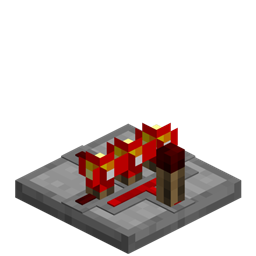
Sticky redstone wiring, repeaters, and comparators that can be placed on walls and ceilings.
 Redstone & Logic
- Downloads
- 12,774,488
- Loaders
- -
- Latest version
- 1.12
- Updated
- 2017-12-29
- Author
- FyberOptic


Overview
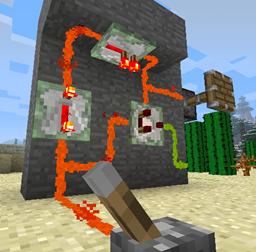
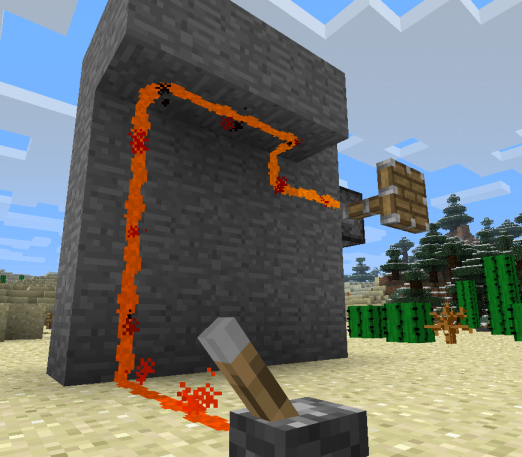
Redstone Paste introduces an adhesive alternative to standard redstone dust, alongside sticky versions of repeaters and comparators. It allows players to route redstone signals and build complex logic across various surfaces, including vertical walls and overhead ceilings.
This mod is ideal for redstone engineers and modpack creators running Minecraft versions 1.7.2 through 1.9.4. By offering configuration options for crafting yields and recipe layouts, it can be easily balanced around the availability of slimeballs or the presence of other installed mods.
Within a tech or automation base, Redstone Paste makes wiring much more compact and organized. Players can direct currents exclusively where needed, run paste right alongside normal redstone dust without accidental cross-talk, and conceal their entire wiring network behind half-slabs.
Key features
- Redstone paste transmits signals across multiple surfaces, including walls and ceilings.
- Sticky repeaters and sticky comparators maintain signal strength and handle logic on any surface where paste is applied.
- Directional placement lets you apply paste to any of the four directions on a block face to strictly control where the current flows.
- Holding the sneak key while placing paste applies it to both the selected segment and the opposite side, or to all four directions if placed in the center.
- Paste can run directly beside vanilla redstone dust without connecting unless you explicitly link them together.
- Half-slabs can be placed horizontally or vertically over a single paste, sticky repeater, or sticky comparator per block space to hide the wiring.
- Stone slabs applied over paste automatically adopt the texture of a standard stone block to blend into the environment better.
- Configuration settings allow you to adjust the crafting output quantity or switch to an alternate recipe consisting of a slimeball surrounded by redstone dust.
How to get started
- Craft your first batch of four Redstone Paste pieces using a shapeless recipe of one slimeball and one redstone dust.
- Craft sticky repeaters and sticky comparators if your planned circuit requires signal boosting or complex logic on walls and ceilings.
- Apply the paste to specific segments of a block face to direct your current, using the sneak key to quickly place opposite segments or fill all four directions at once.
- Adjust your wiring paths by clicking individual highlighted segments to remove them, or click the center area to clear the entire block face.
- Hold a half-slab until a ghost image appears over your placed paste or sticky component, then right-click to cover and hide the circuit.
FAQ
How does Redstone Paste interact with normal redstone dust?
It will only interact with standard redstone dust if you explicitly connect the two; otherwise, they can run side-by-side without transferring any current.
Can I use slabs from other mods to hide my wiring?
Yes, the covering feature works with slabs from any mod that derives from Minecraft's standard slab classes, and Biomes O' Plenty is specifically tested for compatibility.
Are there any limits when hiding components with half-slabs?
Yes, only one Redstone Paste object (whether it is paste, a sticky repeater, or a sticky comparator) can occupy a single block space if you want to cover it with a slab.
How do I remove a half-slab covering my paste?
You can easily remove a covering slab by breaking it with your empty hand or any tool.
Versions and loaders
| Minecraft | Loaders |
|---|---|
| 1.12 | - |
| 1.7.10 | - |